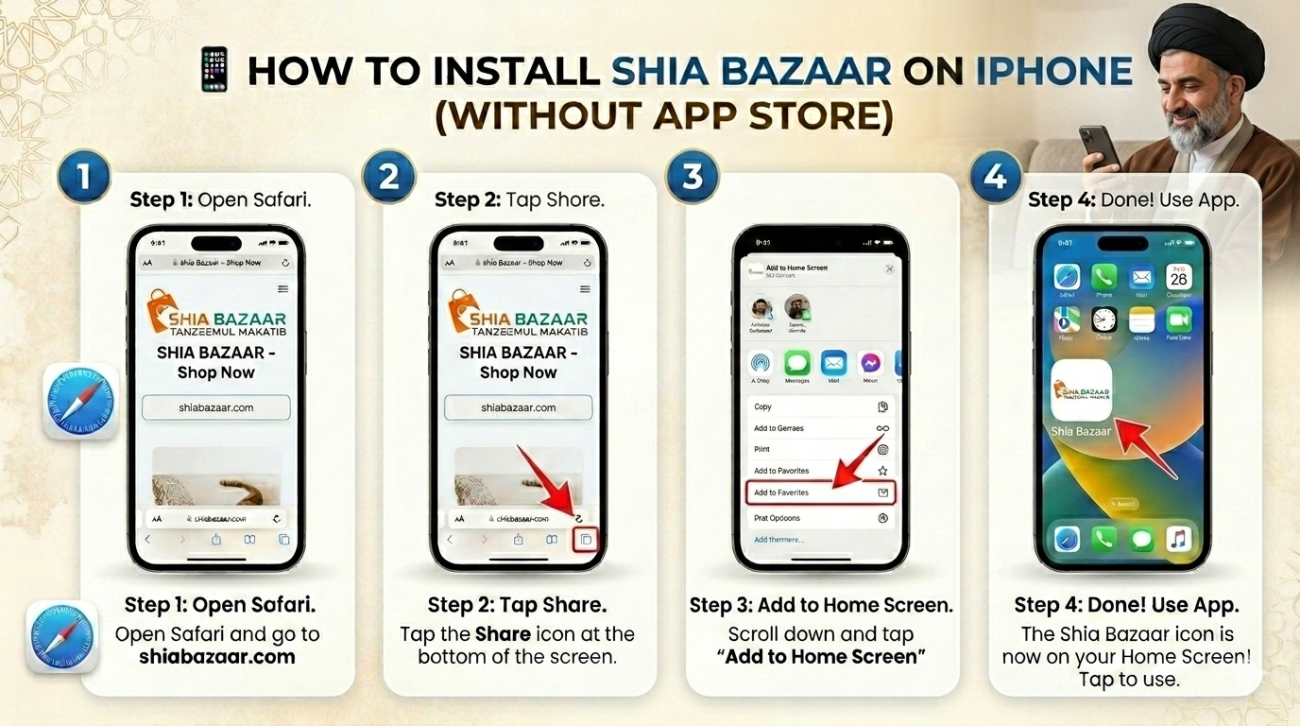
📱 How to Install Shia Bazaar on iPhone
Since the Shia Bazaar app is currently not on the Apple App Store, iPhone users can install it directly onto their home screen using this simple method. It works just like a regular app!
Step-by-Step Instructions
Open Safari Browser Launch the Safari app on your iPhone and go to shiabazaar.com
Tap the ‘Share’ Button At the bottom of the screen, look for the Share icon (a square with an arrow pointing upwards). Tap on it.
Select ‘Add to Home Screen’ Scroll down the list of options until you see “Add to Home Screen.” Tap this option.
Confirm the Name You will see the name “Shia Bazaar” and the app icon. Tap “Add” in the top-right corner.
You’re All Set! The Shia Bazaar icon will now appear on your iPhone home screen. You can open it and use it anytime, just like any other app.
Why use this method?
No App Store Needed: Direct installation without an Apple ID.
Saves Storage: It takes up much less space than a traditional app.
Instant Updates: The app updates automatically every time you open it.
Note: Make sure you are using the Safari browser. Other browsers like Chrome or Firefox do not currently support the “Add to Home Screen” feature on iOS.